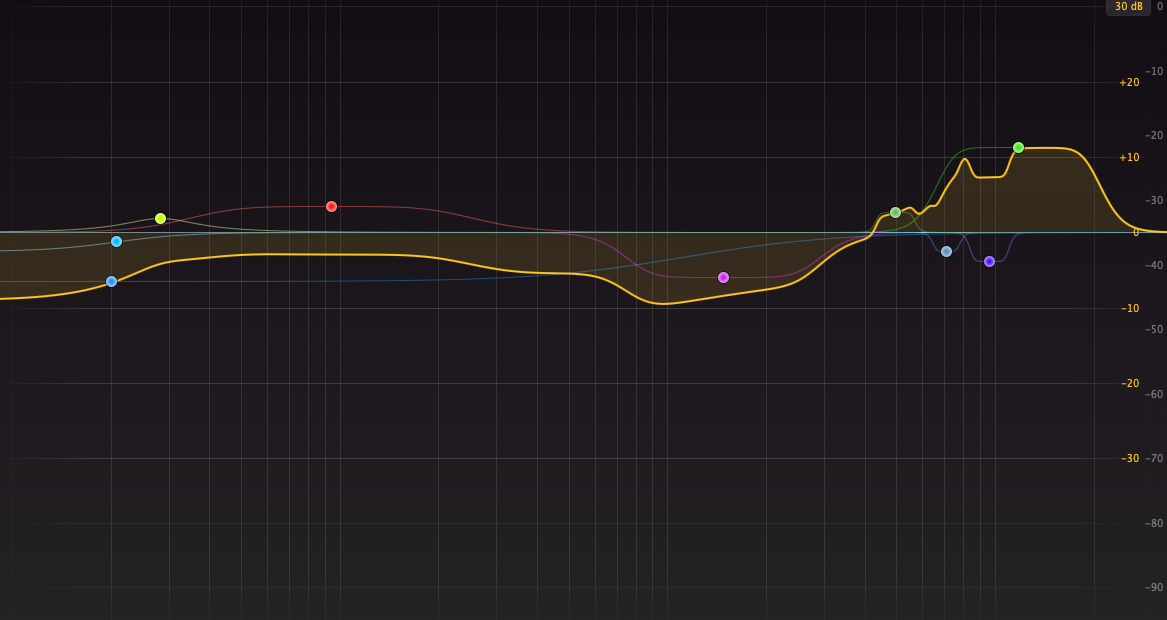

Custom Cutterhead EQ Curve
Custom Cutterhead EQ Curve
Couldn't load pickup availability
To have this set up you will need to be able to fully calibrate your lathe, playback and cutting chain. Below is info on each step that you must be able to dial in before we start.
Lathe Calibration:
- Rake angle
- Stylus travel to centre spindle
- Groove depth (50um to 60um on an unmodulated groove)
Please ensure you have a fully usable one stylus. Also you must stick to one diamond type, each supplier has variances which require different calibration in terms of the lathe and also head mapping. Different stylus types are not straight swap and interchangeable. You must be able to cut a silent groove with low noise floor.
Playback Chain (in order):
- Turntable
- RIAA phono stage
- Level meter
- Monitoring (speakers / headphones)
Calibrate your playback meter to 0 VU using a professional test record and a 1kHz reference tone. From there, monitor your cuts however works for you.
Please send a short video or a couple of photos showing your meter reading 0 VU against the test record before the session. This lets us confirm playback calibration is correct ahead of time, it matters because if this isn’t right, you risk damaging your cutterhead once we start cutting.
Your vacuum system must be fully operational and working without issue.
Cutting Chain (in order):
- Audio Source (Computer or hardware player)
- Volume control (audio interface or monitor controller)
- Cutteramp (must be matched to your cutterhead)
- Cutterhead
To set this system up, we will map your cutterhead for both resonances and frequency response. Playback calibration must be perfect, or you could blow your cutterhead. You need Toneboosters Equalizer Pro for your EQ as this is what we use.
The call will be over Google Meet or WhatsApp.
If you have any questions feel free to ask!
For references on the quality you can get out of a dynamic cutterhead, see HERE
Share